Make Your First Box
In about ten minutes you make a shipping box at your own size and download its dieline as a PDF. The dieline is the flat drawing of your box, with lines for cutting and folding. This example uses FEFCO 0201, the most common corrugated shipping box.
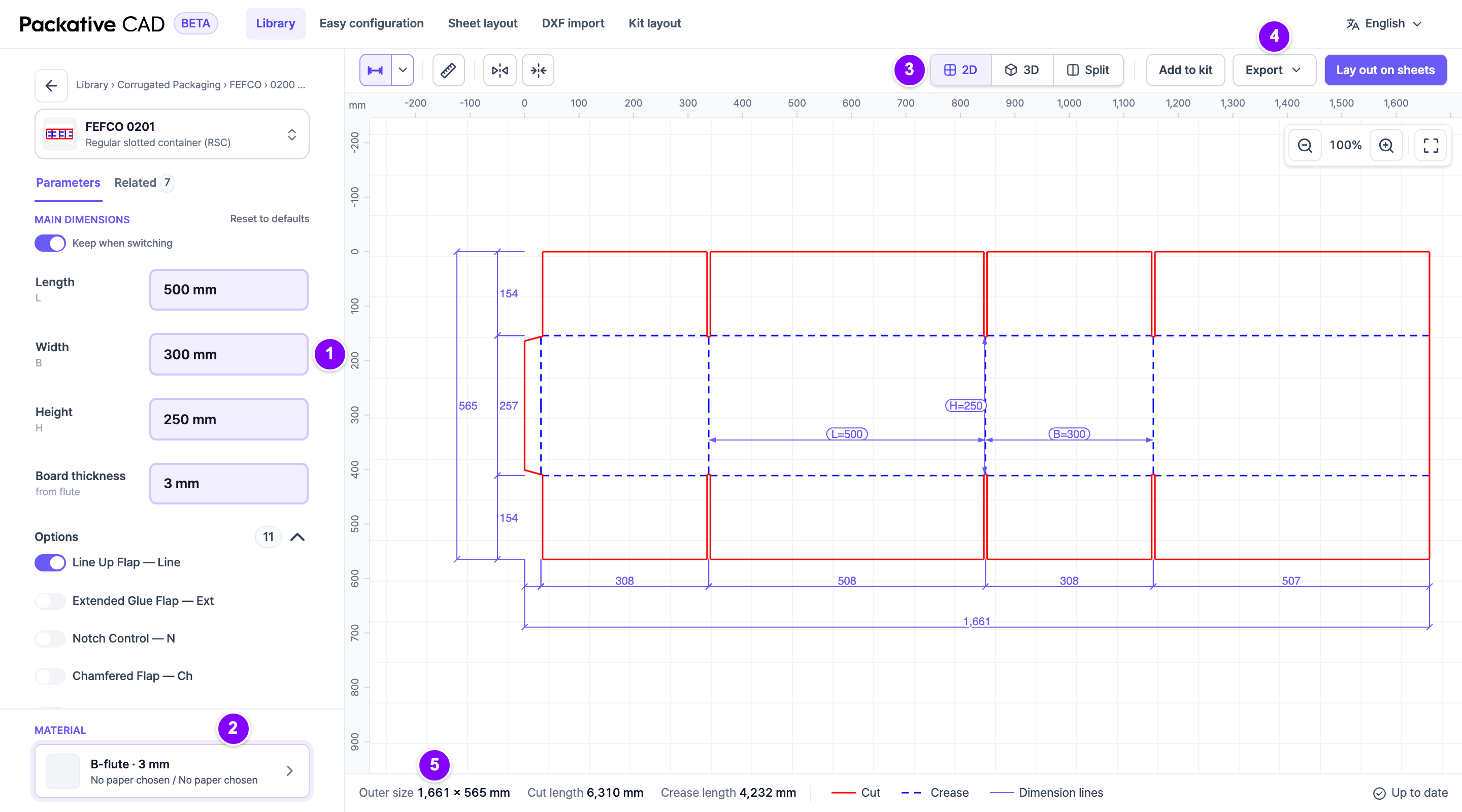
Steps
- Open
https://cad.packative.oneand select Continue with Google. - Open Library in the bar at the top.
- In the search box at the top left, type
0201. - Select the card FEFCO 0201 — Regular slotted container (RSC). The box screen opens.
- 1 Under Main dimensions, type the Length, Width and Height in millimetres, for example 500, 300 and 250. The drawing changes as you type. The small letters under the names (L, B, H) are the names used on the drawing. B is the width.
- 2 Under Material at the bottom left, select the board. In the window that opens, select a Flute, for example B-flute · 3 mm, then select Done. The flute is the wavy middle layer of corrugated board, and it sets how thick the board is. Board thickness fills in from the flute, so leave it as it is.
- 3 Optional: select 3D in the bar above the drawing to see the box folded. Select 2D to go back.
- 4 Select Export at the top right, above the drawing.
- Select the PDF format card.
- Select Export PDF. The file downloads to your computer.
The PDF is at true size, so you can print it 1:1 or send it to your printer.
Good to Know
- Ask your printer or die maker whether your sizes are inside or outside sizes.
- 5 The bottom bar shows the Outer size: the size of the flat box before folding.
- Each step uses a few credits. Browsing the library is free. See Sign In and Credits.
- To share this box, copy the page address. It holds the box style and your sizes.
Change a size on the drawing
Select a measurement on the drawing, type the new value and confirm with Enter.
Check before you make a die
Not every dieline has been tested in production. Check the sizes and the file with your die maker before a cutting tool is made.
What Next
- Need a file for your die maker or for artwork? See Download Files for Print for DXF and Illustrator files.
- Want to know how many boxes fit on a sheet? See Fit Boxes on a Sheet.