Fit Boxes on a Sheet
Sheet layout shows how many copies of one dieline fit on each of your press sheets. You enter your sheet sizes, and the app lists the results, best first.
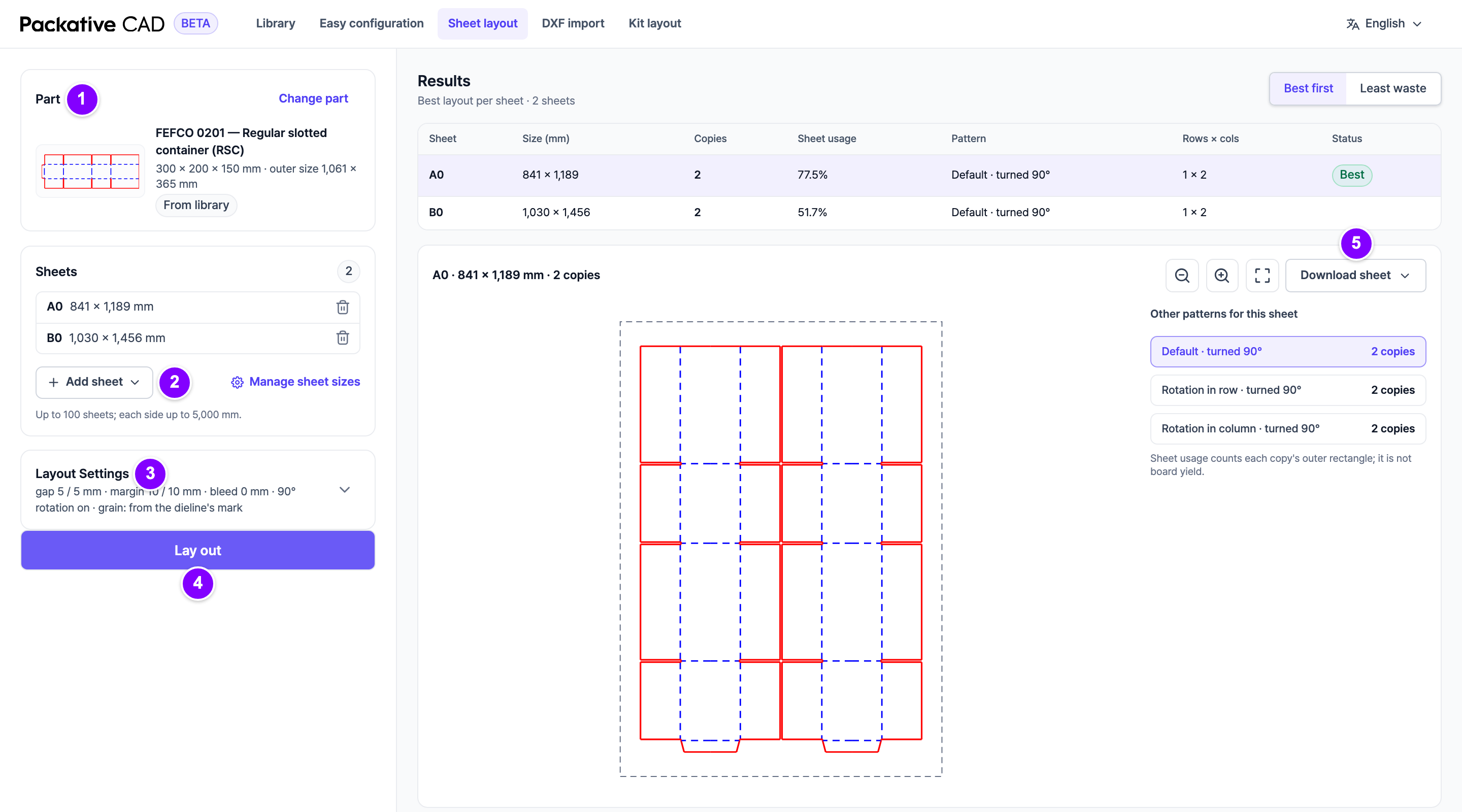
Steps
- 1 Open your dieline and select Lay out on sheets. The Part card shows it. With no part yet, select From library or From DXF.
- The Sheets list starts with the sheets of your last layout. 2 Select Add sheet to pick more from your sheet sizes, or Custom size in the menu for a one-off size. Remove a sheet with its bin icon. To choose which sheets the menu offers, select Manage sheet sizes (see Manage Your Sheet Sizes).
- 3 Open Layout Settings if you want to change the space between copies (Gap X (mm), Gap Y (mm)) or the free border (Margin X (mm), Margin Y (mm)).
- 4 Select Lay out.
- In Results, select a row to see that sheet's layout.
- 5 Select Download sheet and a format: DXF, PDF, SVG or PNG.
Reading the Results
| Column | Meaning |
|---|---|
| Copies (or Boxes per sheet) | How many fit on the sheet. |
| Sheet usage | How much of the sheet the boxes cover. It is not the board yield. |
| Pattern | How copies sit: all the same way, or every second one turned to interlock. |
| Status | Best, or a note such as Not finished in time. |
Other patterns for this sheet shows the other options and their counts.
Good to Know
- You can enter up to 100 sheets, each side up to 5000 mm.
- In the sheet sizes and the layout settings, Enter moves to the next number and Shift+Enter goes back.
- Sheet layout and Print Several Parts Together share the same sheets and settings.
- Grain on the sheet is the direction the grain or flutes run on your board. If your dieline has a grain mark, the app follows it.
- A dieline with several pieces is laid out as full boxes, so the results count Boxes per sheet.
- Each Lay out and each download uses credits. Looking at results is free. See Sign In and Credits.
Tip
Changed the sheets or settings? The results say so. Select Lay out again.
If Something Goes Wrong
- Not finished in time: the search stopped after 30 seconds. A better layout may exist. Try fewer sheets.
- Show sheets where nothing fits (n) lists the sheets with no copies and the reason, for example "Part larger than sheet".